




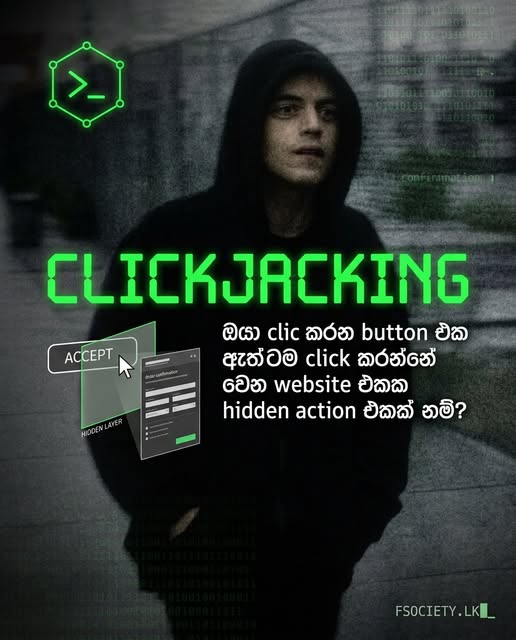

Web page එකක් open කරලා තියෙනවා කියලා හිතන්න.
Screen එකේ පේන්නේ:
“ Claim Your Free Reward”
ඔයා naturally ඒ button එක click කරනවා.
ඒත් browser එකේ වෙන layer එකක, transparent iframe එකක් ඇතුළේ තියෙන්නේ logged-in account එකේ real “Delete Account” / “Change Settings” / “Transfer” / “Like” වගේ action button එකක්.
Userට පේන්නේ එක දෙයක්.
Browser එක execute කරන්නේ වෙන දෙයක්.
මේ category එකේ UI deception attack එකක් තමයි Clickjacking.
 Clickjacking කියන්නේ මොකක්ද?
Clickjacking කියන්නේ user කෙනෙකුගේ genuine mouse click / touch interaction එක, attacker-controlled interface එකක් හරහා වෙන legitimate web action එකකට redirect කරවීමේ technique එකක්.
මේක UI Redress Attack කියලත් හඳුන්වනවා.
Basic idea එක:
Victim
│
▼
Attacker-controlled webpage
│
├── Fake visible button
│
└── Hidden / transparent iframe
│
▼
Target Website
│
▼
Victim’s active session
│
▼
Sensitive action
වැදගත්ම point එක:
Clickjacking එකේ attackerට target website එකේ source code එක directly control කරන්න අවශ්ය නැහැ.
Target application එක browser එක තුළ frame කරන්න ඉඩ දෙනවා නම්, UI layer එක abuse කරන්න පුළුවන්.
 Clickjacking වැඩ කරන්නේ කොහොමද?
සාමාන්ය Clickjacking attack එකක components තුනක් තියෙනවා:
 Target page
උදාහරණයක්:
User already logged in.
 Attacker page
මෙහි attacker-controlled HTML/CSS තිබෙනවා.
 Embedded iframe
Attacker page එක target site එක frame කරන්න try කරනවා.
<iframe src=”https://target.example/account“></iframe>
Target response එක framing allow කළොත් browser එක target page එක render කරනවා.
ඊට පස්සේ attackerට CSS positioning / opacity / layering භාවිතා කරලා තමන්ට අවශ්ය visual interface එක arrange කරන්න පුළුවන්.
 Classic Clickjacking Example
Lab environment එකක conceptual example එකක් බලමු.
Attacker page:
<!DOCTYPE html>
<html>
<head>
<title>Clickjacking Lab</title>
<style>
body {
font-family: sans-serif;
}
.fake-button {
position: absolute;
top: 250px;
left: 200px;
z-index: 1;
padding: 20px 40px;
background: #111;
color: white;
cursor: pointer;
}
iframe {
position: absolute;
top: 200px;
left: 150px;
width: 500px;
height: 300px;
opacity: 0.01;
z-index: 2;
border: none;
}
</style>
</head>
<body>
<button class=”fake-button”>
Claim Reward
</button>
<iframe src=”https://LAB-TARGET.example/account“></iframe>
</body>
</html>
මෙහි objective එක victimගේ browser එකේ target application එක iframe එකක load කරලා, visible UI එකට සමාන location එකක legitimate control එකක් align කිරීම.
මේ example එක real third-party site එකකට use කරන්න එපා. තමන්ගේ lab / CTF / explicitly authorized environment එකකට පමණයි.
 iframe එක මෙච්චර වැදගත් ඇයි?
Clickjacking attack එකේ key dependency එකක් තමයි:
<iframe src=”TARGET”></iframe>
Attacker page එකට target page එක frame කරන්න බැරි නම් classic clickjacking architecture එක බිඳ වැටෙනවා.
ඒ නිසා defense එකේ first question එක:
“මගේ application එක වෙන origin එකක webpage එකකට iframe එකකින් embed කරන්න browser එක allow කරනවද?”
Modern browsers මේ framing decision එකට HTTP response headers use කරනවා.
 MAIN DEFENSE — CSP frame-ancestors
Modern web applications සඳහා ප්රධාන protection mechanism එක:
Content-Security-Policy: frame-ancestors ‘none’;
මෙයින් browser එකට කියන්නේ:
මේ document එක කිසිම parent page එකක frame කරන්න එපා.
එහෙමනම් attacker page එකේ:
<iframe src=”https://target.example/account“></iframe>
දාපු එකෙන් expected target content එක load වෙන්නේ නැහැ.
 frame-ancestors ‘none’
Full example:
HTTP/1.1 200 OK
Content-Security-Policy: frame-ancestors ‘none’;
මේක strongest common policy එකක් — application එක කිසිම framing use case එකකට අවශ්ය නොවන්නේ නම්.
MDN සහ OWASP දෙකම frame-ancestors ‘none’ use case එක frame-based clickjacking protection සඳහා ප්රධාන option එකක් ලෙස document කරනවා.
 Same-Origin එක විතරක් allow කරන්න
Application එක තමන්ගේම pages අතර iframe use කරනවා නම්:
Content-Security-Policy: frame-ancestors ‘self’;
එයින්:
වල document එක same-origin context වලින් frame කිරීම allow වෙන්න පුළුවන්.
External attacker domain එකකට frame permission දෙන්නේ නැහැ.
 Specific trusted origins allow කිරීම
Application එකට third-party embedding legitimately අවශ්ය නම්, specific sources define කරන්න පුළුවන්.
Example:
Content-Security-Policy:
frame-ancestors ‘self’ https://trusted.example;
Conceptually:
Allowed
├── Same origin
Denied
└── any other origin
මෙතන biggest mistake එක තමයි:
“අපි iframe allow කරන නිසා හැම domain එකකටම allow කරමු.”
ඒක unnecessary attack surface එකක්.
 frame-src සහ frame-ancestors එකම දෙයක් නෙවෙයි
Developers අතර common confusion එක:
frame-src
vs
frame-ancestors
frame-src
Page එක කුමන iframe sources load කරන්නද කියන policy එකට අදාලයි.
frame-ancestors
කවුද මේ page එක iframe එකකින් embed කරන්න පුළුවන්? කියන policy එකට අදාලයි.
ඒ නිසා Clickjacking defense එකේ target directive එක:
frame-ancestors
MDN explicitly මේ දෙකේ distinction එක දක්වනවා.
 X-Frame-Options
Legacy / compatibility protection සඳහා තවත් header එකක්:
X-Frame-Options: DENY
මේකෙන් browser එකට:
Do not display this page inside a frame.
කියන policy එකක් ලැබෙනවා.
ප්රධාන values:
X-Frame-Options: DENY
හෝ
X-Frame-Options: SAMEORIGIN
DENY
කිසිම framing එකකට allow නොකරන්න.
SAMEORIGIN
Same-origin framing පමණක් allow කරන්න.
RFC 7034 X-Frame-Options එක browser එකට transmitted content එක frames තුළ display කරන්න පුළුවන්ද කියන server-side policy mechanism එකක් ලෙස define කරනවා.
ALLOW-FROM ගැන වැදගත් point එකක්
පරණ tutorials වල මෙහෙම දකින්න පුළුවන්:
X-Frame-Options: ALLOW-FROM https://example.com
මෙය modern browsers සඳහා obsolete approach එකක්.
OWASP එකත් ALLOW-FROM මත rely කිරීම modern environments සඳහා appropriate defense එකක් නොවන බව සඳහන් කරනවා. frame-ancestors තමයි flexible modern approach එක.
ඒ නිසා random old tutorial එකකින් copy-paste කරලා security configuration කරන්න එපා.
 CSP + X-Frame-Options දෙකම දාන්න පුළුවන්ද?
ඔව්.
Common defense-in-depth pattern එක:
Content-Security-Policy: frame-ancestors ‘none’;
X-Frame-Options: DENY
Modern browsers සඳහා CSP frame-ancestors ප්රධාන control එක.
X-Frame-Options additional compatibility / defense-in-depth layer එකක් ලෙස තබාගන්න පුළුවන්.
 SameSite Cookies — තවත් layer එකක්
Clickjacking protection එකේ තවත් important layer එකක් තමයි:
Set-Cookie: session=…; Secure; HttpOnly; SameSite=Lax
හෝ stronger cross-site restriction අවශ්ය නම්:
Set-Cookie: session=…; Secure; HttpOnly; SameSite=Strict
SameSite setting එක cross-site contexts වල cookie transmission restrict කරන්න පුළුවන්.
මේකෙන් embedded context එකක authentication cookie නොයන අවස්ථා තිබෙන නිසා clickjacking risk එක reduce වෙන්න පුළුවන්.
නමුත්:
SameSite ≠ complete Clickjacking defense
මේක additional / partial mitigation එකක්.
MDN සහ OWASP දෙකම SameSite cookie policy එක clickjacking සඳහා defense-in-depth mechanism එකක් ලෙස පෙන්වනවා.
 Clickjacking vulnerability එක test කරන්නේ කොහොමද?
Authorized lab එකක් / test application එකක් තියෙනවා කියලා හිතමු.
මුලින් response headers inspect කරන්න.
cURL:
curl -I https://target.example/account
Look for:
Content-Security-Policy
X-Frame-Options
Example:
HTTP/2 200
content-security-policy: frame-ancestors ‘none’
x-frame-options: DENY
හෝ potentially weak response එකක්:
HTTP/2 200
content-type: text/html
මෙතන header protection එකක් පෙනෙන්නේ නැහැ.
Header missing = automatically exploitable කියලා direct conclusion එකකට යන්න එපා.
Actual browser behavior සහ page functionality verify කරන්න.
 Burp Suite වලින් test කිරීම
Authorized penetration test එකකදී Burp Suite use කරලා response එක inspect කරන්න පුළුවන්.
PortSwigger current testing guidance අනුව Burp Scanner එකෙන් Frameable response findings identify කළ හැකි අතර, manual proof-of-concept testing සඳහා Clickbandit වැනි functionality භාවිතා කළ හැක.
Basic workflow:
Target
↓
Burp Proxy
↓
HTTP response
↓
Inspect headers
↓
Check frameability
↓
Verify sensitive UI action
↓
Document impact
Scanner finding එකක් තිබුණා කියලා alone critical vulnerability කියලා report කරන්න එපා.
Impact matters.
Clickjacking හැම වෙලාවෙම critical ද?
නැහැ.
මේක common overstatement එකක්.
Example:
Low-impact page
Public About Page
Frameable වීමේ impact එක negligible වෙන්න පුළුවන්.
High-impact page
Account settings
Password management
Financial action
Destructive action
Permission change
Administrative action
මෙවැනි authenticated sensitive action එකක් user interaction එකෙන් trigger කරන්න පුළුවන් නම් impact එක dramatically increase වෙනවා.
ඒ නිසා:
Clickjacking
≠ automatically Critical
Risk assessment එක context-dependent.
Clickjacking vs CSRF
මේ දෙක confuse කරන එක common mistake එකක්.
CSRF
Attacker site එක victim browser එකෙන් unwanted request එකක් trigger කිරීමට try කරනවා.
Conceptually:
Victim Browser
↓
Unwanted HTTP Request
↓
Target Server
Clickjacking
Userගේ visual interaction manipulate කරනවා.
User thinks:
“මම මේ button එක click කරනවා”
Actual:
“iframe එකේ target button එක click වෙනවා”
ඒ නිසා Clickjacking primarily UI / browser rendering + user interaction abuse කරන attack class එකක්.
 Clickjacking vs Phishing
Phishing එකේ attacker fake site එකක් හදලා credentials / data directly obtain කිරීමට try කරන අවස්ථා බොහෝවිට තියෙනවා.
Clickjacking වලදී attacker real target UI එක frame කරලා, userගේ interaction එක වෙන action එකකට redirect කරන deception technique එකක් use කරනවා.
Simple distinction:
Phishing
Fake UI → Victim gives data
Clickjacking
Real UI → Victim performs unintended action
දෙකම social engineering සමඟ combine වෙන්න පුළුවන්.
 Clickjacking එකෙන් කරන්න පුළුවන් දේවල්
Impact application එක මත depend වෙනවා.
Potential examples:
 Unwanted button clicks
Account setting changes
Social actions
Permission-related actions
Destructive actions
State-changing requests
ඒත් attackerට target page එක frame කරන්න පුළුවන් වීම පමණක් sufficient නෙවෙයි.
අවශ්ය වෙන factors:
Frameability
+
User interaction
+
Sensitive target action
+
Required authentication state
+
Application behavior
=
Actual impact
Advanced Point — Authentication එක තිබීම risk එක වැඩි කරනවා
User already logged in:
Browser
│
├── Session Cookie
│
└── Target Website
Target UI එක attacker page එකක් තුළ frameable නම්, userගේ authenticated browser state එක attack scenario එකේ important factor එකක් වෙන්න පුළුවන්.
ඒක නිසා sensitive authenticated pages සඳහා framing policy එක ignore කිරීම dangerous.
MDN clickjacking documentation එකත් logged-in state එකේ target action එක user’s existing credentials සමඟ execute විය හැකි scenario එකක් පැහැදිලි කරනවා.
Important Limitation
මේ misconception එක මතක තියාගන්න:
“X-Frame-Options දාපු ගමන් Clickjacking issue එක 100% solve.”
එහෙම කියන්න බැහැ.
Real security architecture එකේ:
CSP frame-ancestors
+
X-Frame-Options
+
SameSite Cookies
+
CSRF protection where applicable
+
Strong authorization
+
Sensitive-action confirmation
+
Secure UI design
Defense-in-depth approach එකක් better.
OWASPත් multiple independent mechanisms combine කිරීම recommend කරනවා.
 Advanced Insight — Frameable කියන්නේ exploitable කියන එක නෙවෙයි
මේ point එක security testersලාට වැදගත්.
Suppose:
200 OK
and no framing header.
ඒකෙන්:
Frameable
වෙන්න පුළුවන්.
නමුත් vulnerability impact assess කරන්න:
Can the sensitive action be reached?
Can the user click it?
Is authentication required?
Are additional confirmation mechanisms present?
Are there anti-CSRF protections?
Does the application reject the request server-side?
වගේ questions බලන්න ඕනේ.
ඒ නිසා security report එකේ:
“Missing X-Frame-Options”
කියන finding එකට වඩා
“Authenticated sensitive action can be induced through a cross-origin framed UI”
වගේ evidence-based impact description එක stronger.
Developers සඳහා Recommended Baseline
Application එකට framing requirement එකක් නැත්නම්:
Content-Security-Policy: frame-ancestors ‘none’;
X-Frame-Options: DENY;
Session cookie:
Set-Cookie: session=<value>; Secure; HttpOnly; SameSite=Lax
Application එකේ cross-site framing legitimately required නම් frame-ancestors එක business requirement එක අනුව narrowly restrict කරන්න.
උදාහරණයක්:
Content-Security-Policy:
frame-ancestors ‘self’ https://trusted.example;
“Allow everyone” security policy එකක් ලෙස use කරන්න එපා.
LAB CHECKLIST
নিজගේ lab එකක Clickjacking test කරනකොට:
[ ] Target page frameable ද?
[ ] CSP frame-ancestors තිබේද?
[ ] X-Frame-Options තිබේද?
[ ] Sensitive action එකක් තිබේද?
[ ] Authentication අවශ්යද?
[ ] SameSite cookie policy මොකක්ද?
[ ] CSRF defense තිබේද?
[ ] Additional confirmation step එකක් තිබේද?
[ ] Browser behavior verify කළාද?
[ ] Impact reproduce කළාද?
Security testing කියන්නේ header එකක් බලලා checkbox එක tick කරන එක නෙවෙයි.
Real exploitability + impact prove කරන්න ඕන.
 COMMON MISCONCEPTIONS
“Clickjacking කියන්නේ phishing එකක්.”
නැහැ.
ඒක phishing සමඟ combine වෙන්න පුළුවන්, නමුත් Clickjacking එකේ core mechanism එක UI redress / unintended interaction.
“Transparent iframe එකක් තිබුණාම vulnerability confirmed.”
නැහැ.
Target site එක browser එකෙන් frame කිරීමට allow කළ යුතුයි.
ඒ වගේම meaningful target action එකක් තිබිය යුතුයි.
“Missing X-Frame-Options = critical.”
නැහැ.
Risk එක application context එක මත depend වෙනවා.
“SameSite alone is enough.”
නැහැ.
OWASP සහ MDN දෙකම SameSite එක partial / additional defense එකක් ලෙස describe කරනවා.
“JavaScript frame-buster එක modern perfect defense එක.”
නැහැ.
JavaScript frame-busting techniques තිබුණත් server-enforced framing policy එකකට වඩා ඒවා dependent. OWASP frame-busting code එක defense-in-depth / legacy-oriented mechanism එකක් ලෙස discuss කරනවා.
FINAL TAKEAWAY
Clickjacking කියන්නේ fancy CSS trick එකක් විතරක් නෙවෙයි.
මේකේ real security weakness එක:
Browser
+
Frameable Target
+
User Interaction
+
Sensitive Action
මෙම combination එක.
Modern web application එකකට primary protection:
Content-Security-Policy: frame-ancestors ‘none’;
හෝ business requirement අනුව narrowly scoped allowed ancestors.
Additional layer:
X-Frame-Options: DENY
හෝ:
X-Frame-Options: SAMEORIGIN
Authentication cookies සඳහා:
Secure
HttpOnly
SameSite
වගේ controls use කරන්න.
Most important security lesson එක:
Browser එක trust කරන UI relationship එක attacker-controlled page එකකට open කරලා තිබ්බොත්, userගේ click එක attackerගේ weapon එකක් වෙන්න පුළුවන්.
ඒක තමයි Clickjacking එකේ dangerous part එක. 
LEGAL / ETHICAL WARNING
මේ techniques තමන්ගේම lab එකක, CTF environment එකක, test application එකක හෝ explicit permission තියෙන system එකක විතරක් test කරන්න.
වෙනත් කෙනෙකුගේ website එකකට permission නැතුව framing test, exploitation හෝ user-action manipulation කිරීම නීතිවිරෝධී වෙන්න පුළුවන්.
Fsociety.LK